Schema Management (Sculpt CLI)

Master ObjectQuel's Sculpt tool for comprehensive database schema management, from interactive entity generation to automated migrations and reverse engineering from existing databases.

Introduction to Sculpt

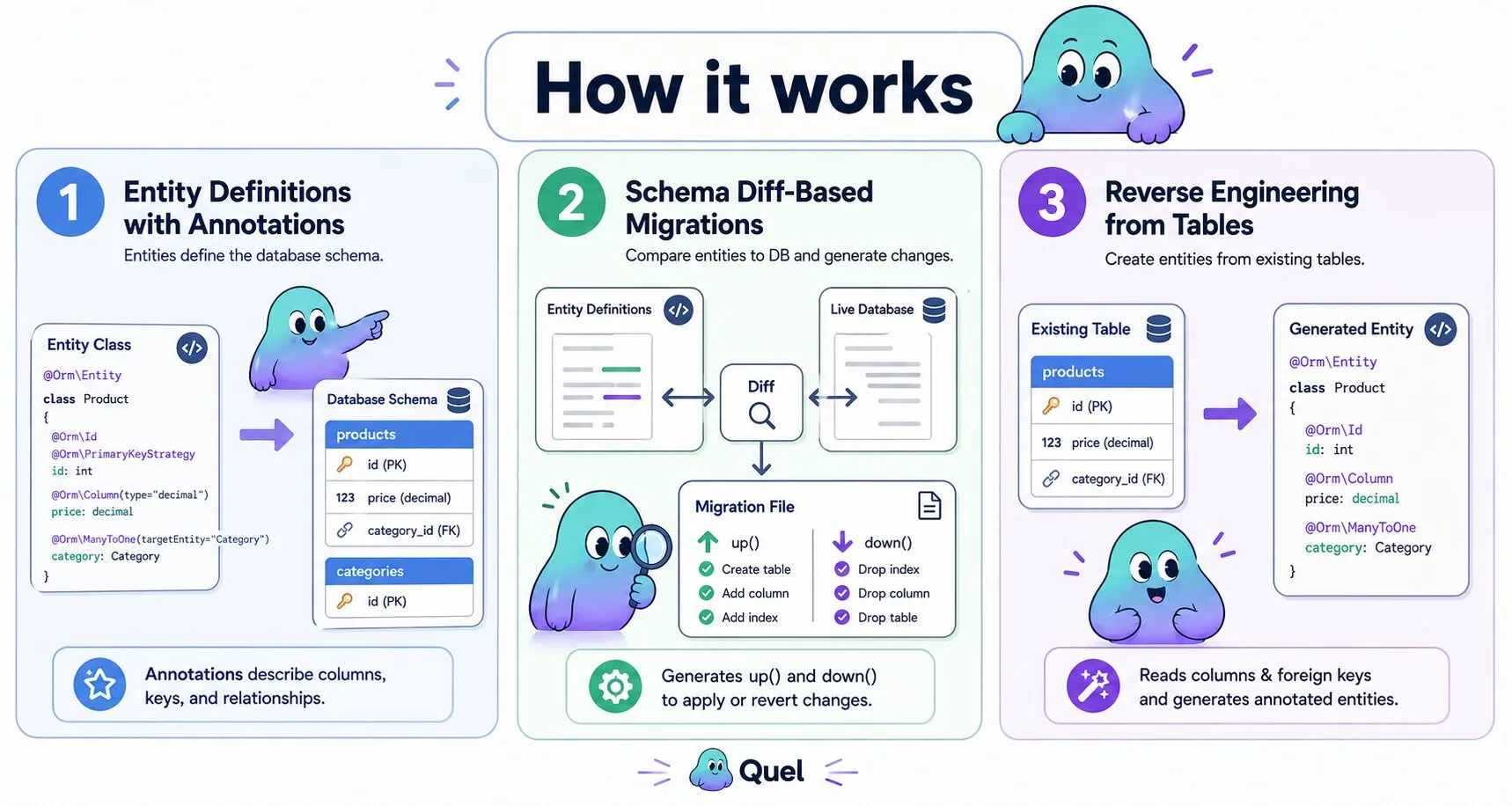
Sculpt is ObjectQuel's powerful command-line tool that bridges the gap between your entity definitions and database schema. It provides interactive entity generation, automated migration creation, and seamless schema synchronization:

# Core Sculpt commands for schema management
php bin/sculpt make:entity              # Interactive entity creation
php bin/sculpt make:entity-from-table   # Generate entity from existing table
php bin/sculpt make:migrations          # Create migrations from entity changes
php bin/sculpt quel:migrate             # Apply migrations to database
php bin/sculpt quel:migrate --rollback  # Rollback recent migrations

Key Benefits:

  • Interactive entity generation with guided prompts
  • Automatic migration generation from entity annotations
  • Reverse engineering from existing database schemas
  • Version-controlled schema changes
  • Database-agnostic migration system

Interactive Entity Generation

The make:entity command provides an interactive wizard for creating properly structured entities:

Basic Entity Creation

$ php bin/sculpt make:entity

 Entity name (e.g., Product, User, Order):
 > Product

 Table name [products]:
 > products

 Add properties to your entity:

 Property name (press <return> to stop adding properties):
 > name

 Property type [string]:
 > string

 Property length [255]:
 > 255

 Can this property be null? [no]:
 > no

 Property name (press <return> to stop adding properties):
 > price

 Property type [string]:
 > decimal

 Property precision [10,2]:
 > 10,2

 Can this property be null? [no]:
 > no

 Property name (press <return> to stop adding properties):
 > description

 Property type [string]:
 > text

 Can this property be null? [no]:
 > yes

 Property name (press <return> to stop adding properties):
 >

 Add relationships to your entity:

 Relationship type (OneToMany, ManyToOne, OneToOne, or press <return> to skip):
 > ManyToOne

 Related entity (e.g., Category, User):
 > Category

 Property name for this relationship [category]:
 > category

 Relationship type (OneToMany, ManyToOne, OneToOne, or press <return> to skip):
 >

 Success! Created: src/Entity/ProductEntity.php

Generated Entity Structure

<?php
namespace App\Entity;

use Quellabs\ObjectQuel\Annotations\Orm;

/**
 * @Orm\Table(name="products")
 */
class ProductEntity {

    /**
     * @Orm\Column(name="product_id", type="integer", primary_key=true)
     * @Orm\PrimaryKeyStrategy(strategy="identity")
     */
    private ?int $productId = null;

    /**
     * @Orm\Column(name="name", type="string", limit=255)
     */
    private string $name;

    /**
     * @Orm\Column(name="price", type="decimal", limit="10,2")
     */
    private float $price;

    /**
     * @Orm\Column(name="description", type="text", nullable=true)
     */
    private ?string $description = null;

    /**
     * @Orm\Column(name="category_id", type="integer")
     */
    private int $categoryId;

    /**
     * @Orm\ManyToOne(targetEntity="CategoryEntity", inversedBy="products")
     */
    private CategoryEntity $category;

    // Generated getters and setters
    public function getProductId(): ?int { return $this->productId; }
    public function getName(): string { return $this->name; }
    public function setName(string $name): void { $this->name = $name; }
    public function getPrice(): float { return $this->price; }
    public function setPrice(float $price): void { $this->price = $price; }
    public function getDescription(): ?string { return $this->description; }
    public function setDescription(?string $description): void { $this->description = $description; }
    public function getCategory(): CategoryEntity { return $this->category; }
    public function setCategory(CategoryEntity $category): void {
        $this->category = $category;
        $this->categoryId = $category->getCategoryId();
    }
}

Reverse Engineering with make:entity-from-table

Generate entities from existing database tables with full annotation support:

Table-to-Entity Generation

$ php bin/sculpt make:entity-from-table

 Available tables:
 [0] categories
 [1] products
 [2] users
 [3] orders
 [4] order_items

 Select table to generate entity from:
 > 1

 Entity name [ProductEntity]:
 > ProductEntity

 Namespace [App\Entity]:
 > App\Entity

 Generate relationships? [yes]:
 > yes

 Success! Created: src/Entity/ProductEntity.php

 Detected relationships:
 - ManyToOne: category_id -> CategoryEntity
 - OneToMany: Referenced by OrderItemEntity.product_id

Generated Entity with Detected Relationships

<?php
namespace App\Entity;

use Quellabs\ObjectQuel\Annotations\Orm;
use Quellabs\ObjectQuel\Collections\EntityCollection;

/**
 * @Orm\Table(name="products")
 * @Orm\Index(name="idx_category_id", columns={"category_id"})
 */
class ProductEntity {

    /**
     * @Orm\Column(name="product_id", type="integer", primary_key=true)
     * @Orm\PrimaryKeyStrategy(strategy="identity")
     */
    private ?int $productId = null;

    /**
     * @Orm\Column(name="name", type="string", limit=255)
     */
    private string $name;

    /**
     * @Orm\Column(name="category_id", type="integer")
     */
    private int $categoryId;

    /**
     * @Orm\Column(name="created_at", type="datetime")
     */
    private \DateTime $createdAt;

    /**
     * Auto-detected relationship based on foreign key
     * @Orm\ManyToOne(targetEntity="CategoryEntity", inversedBy="products")
     */
    private CategoryEntity $category;

    /**
     * Auto-detected inverse relationship
     * @Orm\OneToMany(targetEntity="OrderItemEntity", mappedBy="productId")
     */
    public EntityCollection $orderItems;

    public function __construct() {
        $this->orderItems = new EntityCollection();
    }

    // Generated getters and setters...
}

Automated Migration Generation

The make:migrations command analyzes your entity definitions and generates database migrations automatically:

Creating Migrations from Entity Changes

$ php bin/sculpt make:migrations

 Analyzing entity definitions...
 Comparing with current database schema...

 Changes detected:
 ✓ New table: products
 ✓ New table: categories
 ✓ New index: products.idx_category_id
 ✓ Modified column: users.email (added unique constraint)
 ✓ Dropped column: orders.legacy_status

 Generate migration? [yes]:
 > yes

 Migration name [EntitySchemaMigration]:
 > CreateProductsAndCategories

 Success! Created: database/migrations/20250603_145623_CreateProductsAndCategories.php

Generated Migration File

<?php
use Phinx\Migration\AbstractMigration;

class CreateProductsAndCategories20250603145623 extends AbstractMigration {

    /**
     * This migration was automatically generated by ObjectQuel Sculpt
     *
     * Based on entity definitions:
     * - App\Entity\ProductEntity
     * - App\Entity\CategoryEntity
     */

    public function up(): void {
        // Create categories table
        $this->table('categories', ['id' => false, 'primary_key' => ['category_id']])
            ->addColumn('category_id', 'integer', [
                'limit' => 11,
                'null' => false,
                'signed' => false,
                'identity' => true
            ])
            ->addColumn('name', 'string', [
                'limit' => 255,
                'null' => false
            ])
            ->addColumn('description', 'text', [
                'null' => true
            ])
            ->addColumn('created_at', 'datetime', [
                'null' => false
            ])
            ->create();

        // Create products table
        $this->table('products', ['id' => false, 'primary_key' => ['product_id']])
            ->addColumn('product_id', 'integer', [
                'limit' => 11,
                'null' => false,
                'signed' => false,
                'identity' => true
            ])
            ->addColumn('name', 'string', [
                'limit' => 255,
                'null' => false
            ])
            ->addColumn('price', 'decimal', [
                'precision' => 10,
                'scale' => 2,
                'null' => false
            ])
            ->addColumn('category_id', 'integer', [
                'limit' => 11,
                'null' => false
            ])
            ->addColumn('created_at', 'datetime', [
                'null' => false
            ])
            ->addIndex(['category_id'], [
                'name' => 'idx_category_id'
            ])
            ->addForeignKey('category_id', 'categories', 'category_id', [
                'delete' => 'RESTRICT',
                'update' => 'CASCADE'
            ])
            ->create();

        // Modify existing users table
        $this->table('users')
            ->addIndex(['email'], [
                'name' => 'idx_unique_email',
                'unique' => true
            ])
            ->removeColumn('legacy_status')
            ->save();
    }

    public function down(): void {
        $this->table('products')->drop()->save();
        $this->table('categories')->drop()->save();

        $this->table('users')
            ->removeIndex(['email'])
            ->addColumn('legacy_status', 'string', ['limit' => 20, 'null' => true])
            ->save();
    }
}

Migration Execution and Management

Applying Migrations

# Apply all pending migrations
$ php bin/sculpt quel:migrate

 Pending migrations:
 ✓ 20250603_145623_CreateProductsAndCategories.php
 ✓ 20250603_150112_AddProductIndexes.php

 Apply migrations? [yes]:
 > yes

 == 20250603145623 CreateProductsAndCategories: migrating
 == 20250603145623 CreateProductsAndCategories: migrated (0.0234s)

 == 20250603150112 AddProductIndexes: migrating
 == 20250603150112 AddProductIndexes: migrated (0.0156s)

 All Done. Took 0.0390s

Migration Rollback

# Rollback the last migration
$ php bin/sculpt quel:migrate --rollback

 Last migration: 20250603_150112_AddProductIndexes.php

 Rollback this migration? [yes]:
 > yes

 == 20250603150112 AddProductIndexes: reverting
 == 20250603150112 AddProductIndexes: reverted (0.0123s)

# Rollback multiple migrations
$ php bin/sculpt quel:migrate --rollback --steps=3

 Rollback 3 migrations? [yes]:
 > yes

 == 20250603150112 AddProductIndexes: reverting
 == 20250603150112 AddProductIndexes: reverted (0.0123s)
 == 20250603145623 CreateProductsAndCategories: reverting
 == 20250603145623 CreateProductsAndCategories: reverted (0.0234s)
 == 20250603140055 CreateUsersTable: reverting
 == 20250603140055 CreateUsersTable: reverted (0.0198s)

Migration Status and Information

# Check migration status
$ php bin/sculpt quel:migrate --status

 Status   Migration ID    Migration Name
 ----------------------------------------------
    up    20250603140055  CreateUsersTable
    up    20250603145623  CreateProductsAndCategories
  down    20250603150112  AddProductIndexes
  down    20250603151034  AddProductReviews

# Get detailed help
$ php bin/sculpt help quel:migrate

Description:
  Execute database migrations

Usage:
  quel:migrate [options]

Options:
      --rollback        Rollback the last migration
      --steps=STEPS     Number of migrations to rollback [default: 1]
      --dry-run         Show what would be executed without running
      --status          Show migration status

Advanced Schema Management

Complex Entity Relationships

$ php bin/sculpt make:entity

 Entity name:
 > OrderItem

 Add relationships:

 Relationship type:
 > ManyToOne

 Related entity:
 > Order

 Relationship type:
 > ManyToOne

 Related entity:
 > Product

 Add indexes for performance? [yes]:
 > yes

 Success! Created OrderItemEntity with optimized indexes

Generated Entity with Performance Optimizations

/**
 * @Orm\Table(name="order_items")
 * @Orm\Index(name="idx_order_performance", columns={"order_id", "product_id"})
 * @Orm\Index(name="idx_product_sales", columns={"product_id", "quantity", "unit_price"})
 * @Orm\UniqueIndex(name="unq_order_product", columns={"order_id", "product_id"})
 */
class OrderItemEntity {

    /**
     * @Orm\Column(name="order_item_id", type="integer", primary_key=true)
     * @Orm\PrimaryKeyStrategy(strategy="identity")
     */
    private ?int $orderItemId = null;

    /**
     * @Orm\Column(name="order_id", type="integer")
     */
    private int $orderId;

    /**
     * @Orm\Column(name="product_id", type="integer")
     */
    private int $productId;

    /**
     * @Orm\Column(name="quantity", type="integer")
     */
    private int $quantity;

    /**
     * @Orm\Column(name="unit_price", type="decimal", limit="10,2")
     */
    private float $unitPrice;

    /**
     * @Orm\ManyToOne(targetEntity="OrderEntity", inversedBy="items")
     * @Orm\RequiredRelation
     */
    private OrderEntity $order;

    /**
     * @Orm\ManyToOne(targetEntity="ProductEntity", inversedBy="orderItems")
     * @Orm\RequiredRelation
     */
    private ProductEntity $product;
}

Development Workflow Integration

Typical Development Cycle

# 1. Create new entity
$ php bin/sculpt make:entity
# Interactive creation of CustomerEntity

# 2. Generate migration for new entity
$ php bin/sculpt make:migrations
# Analyzes CustomerEntity, creates migration

# 3. Apply migration to development database
$ php bin/sculpt quel:migrate
# Creates customers table with proper schema

# 4. Modify entity (add properties, relationships)
# Edit src/Entity/CustomerEntity.php manually

# 5. Generate migration for changes
$ php bin/sculpt make:migrations
# Detects changes, creates alter table migration

# 6. Apply changes
$ php bin/sculpt quel:migrate
# Updates database schema to match entity

# 7. Test in development
# Run application tests to verify changes

# 8. Commit to version control
$ git add .
$ git commit -m "Add Customer entity with contact information"

# 9. Deploy to staging/production
$ php bin/sculpt quel:migrate
# Applies same migrations to production database

Team Collaboration

# Developer A creates new feature
$ php bin/sculpt make:entity
$ php bin/sculpt make:migrations
$ git push

# Developer B pulls changes
$ git pull
$ php bin/sculpt quel:migrate  # Applies A's migrations locally

# Both developers stay synchronized with same schema

Production Deployment Strategies

Safe Production Migrations

# Review pending migrations before applying
$ php bin/sculpt quel:migrate --status

 Status   Migration ID    Migration Name
 ----------------------------------------------
    up    20250603140055  CreateUsersTable
    up    20250603145623  CreateProductsAndCategories
  down    20250603150112  AddCustomerIndexes
  down    20250603151034  OptimizeProductQueries

# Use dry-run to preview changes
$ php bin/sculpt quel:migrate --dry-run

 Would execute:
 == 20250603150112 AddCustomerIndexes: migrating
 CREATE INDEX idx_customer_email ON customers (email);
 CREATE INDEX idx_customer_region ON customers (region, status);

 == 20250603151034 OptimizeProductQueries: migrating
 ALTER TABLE products ADD COLUMN search_vector TEXT;
 CREATE INDEX idx_product_search ON products (search_vector);

# Apply with confidence
$ php bin/sculpt quel:migrate

Rollback Strategy

# Backup before major migrations
$ mysqldump database > backup_before_migration.sql

# Apply migration
$ php bin/sculpt quel:migrate

# If issues occur, rollback immediately
$ php bin/sculpt quel:migrate --rollback

# Or restore from backup if rollback insufficient
$ mysql database < backup_before_migration.sql

Best Practices and Tips

Entity Design Guidelines:

  • Use descriptive entity and property names
  • Define appropriate relationships during entity creation
  • Add indexes for frequently queried columns
  • Use nullable types correctly for optional properties
  • Consider data validation constraints

Migration Management:

  • Generate migrations frequently during development
  • Review generated migrations before applying
  • Use descriptive migration names
  • Test migrations on staging before production
  • Keep migration files in version control

Performance Considerations:

  • Add indexes during entity creation, not as afterthought
  • Use composite indexes for multi-column queries
  • Consider unique constraints for data integrity
  • Plan for schema evolution from the beginning
  • Monitor query performance and adjust indexes accordingly

Sculpt provides a complete schema management solution that keeps your database schema synchronized with your entity definitions while maintaining full version control and deployment flexibility.