 ️
️ Hybrid Data Sources (JSON + database)
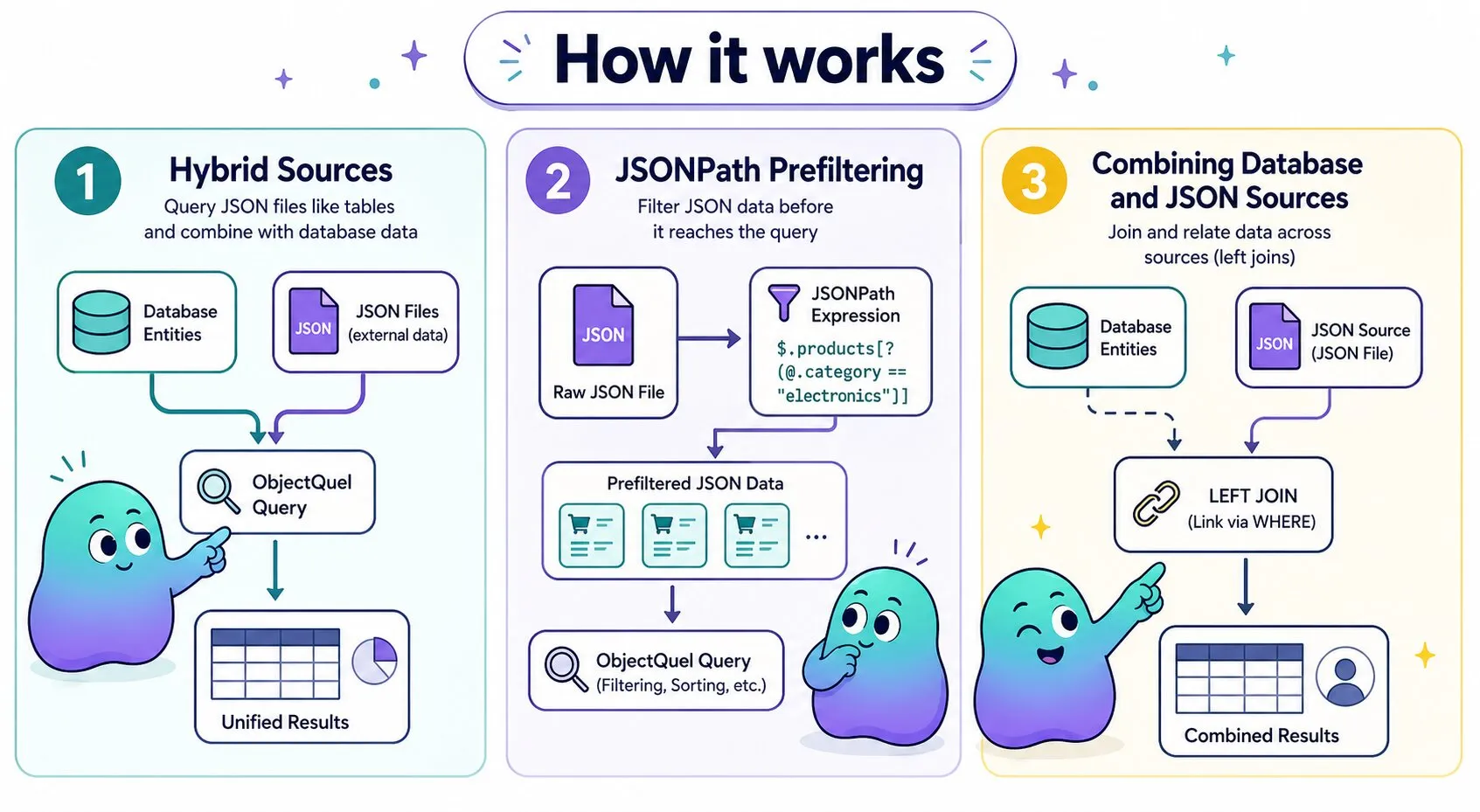
Hybrid sources let you query JSON files as if they were database tables, and join them directly with database entities using familiar ObjectQuel syntax.
Querying JSON Sources
json_source() defines a JSON file as a queryable range within an ObjectQuel query, supporting filtering, sorting, and property selection. It accepts a file path and an optional JSONPath expression for prefiltering, in two equivalent forms:
json_source('file.json')/json_source('file.json', '$[*]')— positional, more concisejson_source(file='file.json', jsonPath='$[*]')— named arguments, order-independent
// Select specific properties
$results = $entityManager->executeQuery("
    range of product is json_source('data/products.json')
    retrieve (product.name, product.price) where product.id = :productId
", ['productId' => 15]);

// Named arguments — order does not matter
$results = $entityManager->executeQuery("
    range of product is json_source(file='catalog/products.json', jsonPath='$.products[*]')
    retrieve (product.name, product.price) where product.inStock = true
");

// jsonPath first — equally valid
$results = $entityManager->executeQuery("
    range of log is json_source(jsonPath='$[?(@.level == \"ERROR\")]', file='logs/app.json')
    retrieve (log.timestamp, log.message, log.level) where log.timestamp > :since
", ['since' => '2025-06-01']);
JSON File Structure
JSON files must contain an array of objects with a consistent structure:
[
  { "id": 1, "name": "Wireless Headphones", "price": 99.99, "category": "electronics", "inStock": true,  "tags": ["wireless", "audio", "bluetooth"] },
  { "id": 2, "name": "Gaming Mouse",        "price": 59.99, "category": "electronics", "inStock": false, "tags": ["gaming", "precision", "rgb"] },
  { "id": 3, "name": "Coffee Mug",          "price": 12.99, "category": "kitchen",     "inStock": true,  "tags": ["ceramic", "dishwasher-safe"] }
]
JSONPath Prefiltering
The second parameter of json_source() accepts a JSONPath expression (powered by softcreatr/jsonpath), filtering the data before it reaches the query processor. Use it to reduce memory usage on large files, or to navigate into nested structures that don't start with a flat array:
// Only error entries are loaded into memory
$results = $entityManager->executeQuery("
    range of log is json_source('logs/massive_log.json', '$[?(@.level == \"ERROR\")]')
    retrieve (log.timestamp, log.message, log.level) where log.timestamp > :since
", ['since' => '2025-06-01']);

// Navigate into a nested structure
$results = $entityManager->executeQuery("
    range of product is json_source('catalog/products.json', '$.products[?(@.category == \"electronics\")]')
    retrieve (product.name, product.price, product.inStock) where product.price > :minPrice
", ['minPrice' => 50.00]);

// Flatten nested arrays
$results = $entityManager->executeQuery("
    range of order is json_source('orders/daily.json', '$.orders[*].items[*]')
    retrieve (order.productId, order.quantity, order.unitPrice) where order.quantity > :minQty
", ['minQty' => 2]);
JSONPath Expression Reference
| Expression | Example | Description |
|---|---|---|
$[*] |
json_source('products.json', '$[*]') |
All items in a root array |
$.products[*] |
json_source('catalog.json', '$.products[*]') |
All items in a named array nested under a key |
$[?(@.level == "ERROR")] |
json_source('app.log', '$[?(@.level == "ERROR")]') |
Filter by exact field value |
$[?(@.price > 50)] |
json_source('products.json', '$[?(@.price > 50)]') |
Filter by numeric comparison |
$[?(@.inStock)] |
json_source('products.json', '$[?(@.inStock)]') |
Filter by truthy field |
$.orders[*].items[*] |
json_source('orders.json', '$.orders[*].items[*]') |
Flatten nested arrays into a single sequence |
$[0:10] |
json_source('products.json', '$[0:10]') |
Slice — first 10 items only |
For a full reference and interactive evaluator, see jsonpath.com.
Combining Database and JSON Sources
JSON sources can be joined with database entities. The join type is inferred automatically from the WHERE clause — you never declare it explicitly.
| WHERE clause | Join type | Effect |
|---|---|---|
| No condition linking the two ranges | Cross | Cartesian product |
| Join condition only | Left | All database rows returned; unmatched JSON fields are null |
Join condition + scalar filter on a JSON field, or IS NOT NULL on a JSON field |
Inner | Only database rows with a matching JSON record are returned |
// Left join: unmatched orders still appear, with null product fields
$results = $entityManager->executeQuery("
    range of order is App\\Entity\\OrderEntity
    range of product is json_source('external/product_catalog.json')
    retrieve (order, product.name, product.price, product.inStock) where order.productId = product.id
    and order.status = :status
    sort by order.orderDate desc
", ['status' => 'pending']);

// Inner join: scalar filter on JSON field — only orders with an in-stock product
$results = $entityManager->executeQuery("
    range of order is App\\Entity\\OrderEntity
    range of product is json_source('external/product_catalog.json')
    retrieve (order, product.name, product.price, product.inStock) where order.productId = product.id
    and product.inStock = true
");

// Inner join: IS NOT NULL — only orders where a product record exists
$results = $entityManager->executeQuery("
    range of order is App\\Entity\\OrderEntity
    range of product is json_source('external/product_catalog.json')
    retrieve (order, product.name, product.price, product.inStock) where order.productId = product.id
    and product.name is not null
");

// Multiple JSON sources
$results = $entityManager->executeQuery("
    range of user is App\\Entity\\UserEntity
    range of profile is json_source('profiles/user_profiles.json')
    range of settings is json_source('settings/app_settings.json')
    retrieve (user, profile.displayName, settings.colorScheme)
    where user.userId = profile.user_id
    and profile.theme = settings.theme_name
    and user.active = true
");
via syntax for defining relationships is not supported for JSON sources.
Enriching Entities with JSON Data
When joining a database entity against a JSON source, ObjectQuel can write matched JSON field values directly onto the entity's properties — without any manual mapping step after the query. Add @Orm\SourceField to a property to declare where its value should come from:
use Quellabs\ObjectQuel\Annotations\Orm;

/**
 * @Orm\Table(name="orders")
 */
class OrderEntity {

    /**
     * @Orm\Column(name="order_id", type="integer", primary_key=true)
     */
    private ?int $orderId = null;

    /**
     * @Orm\Column(name="product_id", type="integer")
     */
    private int $productId;

    /**
     * @Orm\Column(name="status", type="string", limit=50)
     */
    private string $status;

    /**
     * Populated automatically from the JSON source when a matching record is found.
     * @Orm\SourceField(field="name")
     */
    private ?string $productName = null;

    /**
     * @Orm\SourceField(field="price")
     */
    private ?float $productPrice = null;

    /**
     * @Orm\SourceField(field="inStock")
     */
    private ?bool $productInStock = null;

    public function getProductName(): ?string { return $this->productName; }
    public function getProductPrice(): ?float { return $this->productPrice; }
    public function isProductInStock(): ?bool { return $this->productInStock; }
}
With the annotation in place, simply retrieve the entity — the JSON fields are written onto it automatically:
$results = $entityManager->executeQuery("
    range of order is App\\Entity\\OrderEntity
    range of product is json_source('external/product_catalog.json', '$.products[*]')
    retrieve (order)
    where order.productId = product.id and
          order.status = :status
    sort by order.orderDate desc
", ['status' => 'pending']);

foreach ($results as $row) {
    $order = $row['order'];
    echo $order->getProductName();    // "Wireless Headphones"
    echo $order->getProductPrice();   // 99.99
    echo $order->isProductInStock();  // true
}@Orm\SourceField writes the value onto the entity in addition to — not instead of — returning it in the row.
Range Inference
When the query contains exactly one JSON source, the range parameter can be omitted and ObjectQuel infers it automatically. When the query contains multiple JSON sources, range is required to resolve the ambiguity:
// Single JSON source — range is inferred automatically
/**
 * @Orm\SourceField(field="name")
 */
private ?string $productName = null;

// Multiple JSON sources — range must be explicit
/**
 * @Orm\SourceField(field="displayName", range="profile")
 */
private ?string $displayName = null;

/**
 * @Orm\SourceField(field="colorScheme", range="settings")
 */
private ?string $colorScheme = null;
Omitting range when multiple JSON sources are present is a semantic error caught at query compilation time, before any data is loaded.
No-data Behaviour
If the named JSON range is not present in the current query, the property is left untouched — it retains whatever default value the entity defines. No error is raised. This means the same entity class can be used in queries that include the JSON source and in queries that do not; @Orm\SourceField is silently ignored in the latter case.
Best Practices
- Keep files focused: Aim for files under 10MB; larger datasets should be imported into database tables with proper indexes
- Prefilter with JSONPath: Always prefilter large files or nested structures to avoid loading unnecessary data into memory
- Index the join key: The database field used as the join key should be indexed, as the SQL stage runs first and its result set drives the correlation pass
- Consistent schema: Maintain a uniform object structure within each JSON file
- Validate paths: Sanitize file path inputs to prevent directory traversal attacks
- Version control your data: Include JSON data files in your backup and version control systems